
Start page and real tabs
Open multiple tabs, restore a previous session, manage bookmarks, and keep up to six quick-link cards on the start page.
Download AA Browser APK v2.2 through the project's official GitHub Release. Before installing, confirm that your phone runs Android 15 or later, review the file details below, and use the app only while safely parked or as a passenger.
A 15-second verification countdown runs before this site opens the official GitHub APK file.
The details in this table were checked against the GitHub Releases API, the current project README, and the app's Gradle configuration on August 12, 2026. The button opens the developer's direct GitHub asset after the countdown; this site does not host a mirror.
The developer explicitly warns about impersonation websites. AA Browser Wiki is an independent guide, not the official project. You can verify every release at kododake/AABrowser Releases.
| App | AA Browser |
|---|---|
| Latest verified release | 2.2 |
| Published | June 13, 2026 |
| APK filename | AABrowser-2.2.apk |
| File size | 6,763,349 bytes (about 6.45 MiB) |
| Package | com.kododake.aabrowser |
| Minimum Android | Android 15 / API 35 |
| License | GNU GPL v3.0 |
| SHA-256 | 0b7d800f081e0f785a6a89f33d46c5baea697cd0b6e0750ef86d950ec5f85d40 |
AA Browser is an open-source WebView browser designed for Android Auto head units. Instead of stretching a normal phone browser across a dashboard, it provides an automotive-oriented interface with browser tabs, bookmarks, a start page, quick links, theme controls, desktop mode, display scaling, and a compact URL bar. The project is developed publicly under the GNU GPL v3.0 license in the kododake/AABrowser GitHub repository.
The strongest reason to use this AA Browser APK download page is verification. APK searches attract copied files and misleading claims, while the developer says GitHub is the only official distribution source. This page records the exact release tag, filename, byte size, Android requirement, package name, and GitHub-provided SHA-256 digest so you can compare the file you receive with the first-party release metadata.
AA Browser is intended for stationary use. A web page can demand long attention, and that is incompatible with driving. The project's own README tells drivers not to look at the app while steering. Treat the browser as something for charging stops, parked time, or passengers, and follow local traffic laws and the restrictions of your vehicle and Android Auto setup.
Open multiple tabs, restore a previous session, manage bookmarks, and keep up to six quick-link cards on the start page.
Use a persistent URL bar, configurable quick-action button, global display scaling, and an interface shaped for automotive displays.
Switch between light and true-black themes, with optional page darkening and a custom start-page background.
Review the source code, release history, manifest, package identifier, license, and issue tracker before deciding to install.
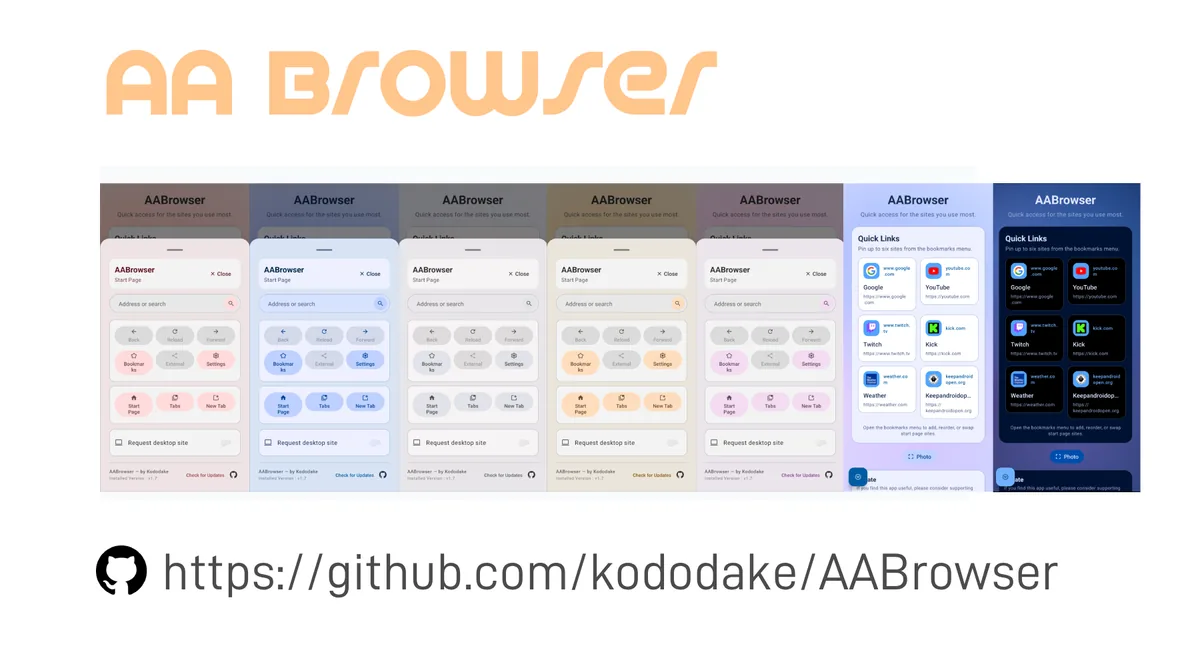
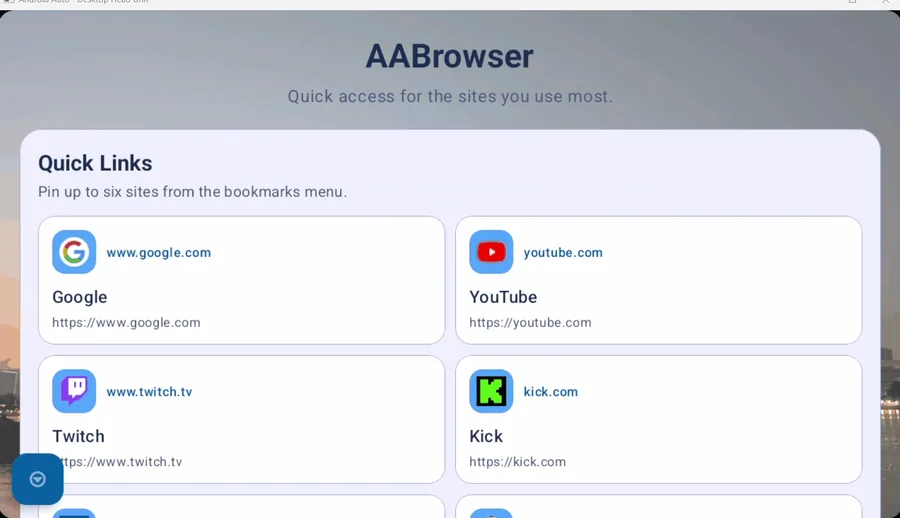
These compressed WebP images come from the official repository. They show the application rather than a generated mockup, so the layout you inspect is tied to the real project.
The current AA Browser 2.2 build uses a minimum SDK of API 35. That translates to Android 15 or later on the phone that runs Android Auto. Version labels from older search results do not override the requirement in the current source configuration.
AA Browser 2.2 declares minSdk = 35. A compatible Android Auto setup and permission to sideload the APK are also required.
The current APK should be rejected on Android 14 because that system is below the declared minimum. Read the Android 14 compatibility explanation.
An APK is an Android package and cannot be installed on an iPhone. The GitHub project does not publish an iOS build.
AA Browser 1.3 declared Android 10 / API 29 as its minimum, which explains why people search for the old version on older phones. That does not guarantee that 1.3 will work with every current Android Auto release or vehicle. Use the AA Browser 1.3 page to review its verified facts and trade-offs before choosing an older build.
Installing AA Browser involves both normal Android sideloading and an Android Auto developer option. Menu wording can vary by phone manufacturer, so verify each prompt instead of approving unrelated permissions.
Open the complete installation guideConfirm Android 15 or later for version 2.2. If the phone is on Android 14, stop: the current APK does not meet that system version.
Use the verified release button and confirm that the filename is AABrowser-2.2.apk. Optionally compare the SHA-256 digest before opening it.
Allow your browser or file manager to install unknown apps only for this task, open the downloaded file, review the Android installer prompt, and complete installation.
Open Android Auto settings, tap the Version section ten times to unlock Developer Settings, open the three-dot menu, and enable Unknown sources.
Version 2.2 focuses on interface polish and interaction improvements. The summary below is based on the developer's release notes rather than an inferred changelog.
Start-page cards received transparent panel and stroke styling designed to blend with the selected wallpaper or theme.
Quick Access slots, bookmarks, and browser tabs can be reordered directly, reducing the work needed to keep frequently used destinations accessible.
Settings show current configuration more cleanly, while the update checker uses different visual states for up-to-date and new-release results.
The release modernized deprecated APIs, refreshed SSL/TLS and client-certificate dialogs, upgraded dependencies, and improved image and memory handling.
Use 2.2 when your device meets the Android 15 requirement. Keep older versions as a compatibility decision, not an automatic recommendation: old builds lack later fixes and features.
Current verified GitHub release with the newest interface, reordering controls, update states, and code maintenance. Requires Android 15+.
Compare all versionsOlder official release with Android 10+ declared support, a redesigned UI, vertical head-unit support, QR sharing, and user-agent settings.
Review version 1.3Learn how the repository owner, release path, filename, package name, license, and checksum work together to identify the real project.
Verify the GitHub sourceThe latest non-prerelease GitHub release checked on August 12, 2026 is AA Browser 2.2, published June 13, 2026. Its official asset is AABrowser-2.2.apk.
The developer states that github.com/kododake/AABrowser is the only official source. Downloads on this independent site resolve to that repository's Release assets.
AA Browser 2.2 does not support Android 14 because its current Gradle configuration declares Android 15 / API 35 as the minimum. Version 1.3 declared Android 10+, but using an older build involves compatibility and missing-update trade-offs.
No. APK files are Android application packages and cannot be installed on iOS. The official AA Browser repository does not provide an iPhone build.
The official project currently distributes releases through GitHub and recommends Obtainium as an optional update method. This site does not claim that a Google Play listing exists.
First confirm Android and app compatibility. Then unlock Android Auto Developer Settings and enable Unknown sources as described by the developer. If the app still does not start, the README suggests opening a non-Google Maps navigation app such as Waze before opening AA Browser.
The current source configuration uses com.kododake.aabrowser. Package identity is one useful check, but you should also verify the GitHub owner, release path, filename, and checksum.
No. The developer describes it as a stationary-use app and tells drivers not to look at it while steering. Use it only when safely parked or as a passenger, subject to local law and vehicle restrictions.
Compare the filename AABrowser-2.2.apk, 6,763,349-byte size, package com.kododake.aabrowser, and GitHub SHA-256 with the release details above. A matching digest confirms that the bytes match the official asset; it is not a separate malware audit.
The button opens the verified v2.2 asset after a 15-second countdown. Confirm the filename, Android requirement, and SHA-256 before installation.
A 15-second verification countdown runs before this site opens the official GitHub APK file.